ss_blog_claim=2e94f0887f73e6585a7215e268b58384 Dot Blogger: web tools

Translate This

Showing posts with label web tools. Show all posts

Wednesday, April 29, 2009

Get paid to Tweet with Twtad


You enjoy Tweeting with your friends, but wouldn't it be great to make extra cash on the site while you post on twitter? Twtad has the solution . We give you links to post on your Twitter account and you earn money each time someone clicks your link. Get paid to tweet could not be easier...
The twtAd referral program is a great way to spread the word of this great service and to earn even more money with your Twitter account! Refer friends! Just send them the link below, post it on your Twitter, post it on your website, http://twtad.com/?id=5255

Be Sure to Leave Your Comments!

Monday, February 16, 2009

Contextual Ads and Affiliate Programs- Why Topics matter


Why Topic Matters
Contextual Ads - Different topics and keywords within topics will trigger different ads in contextual ad programs and as a result will earn different levels ‘per click).
Affiliate Programs - Similarly, different topics will open up different levels of earnings when it comes to affiliate programs. For example a blog about books that uses the Amazon program is only ever likely to make small commissions per sale as the average book might only be worth $20 and the commission with Amazon is generally in the 5-8% range. On the other hand I know of publishers in the financial website game who use affiliate programs that can pay out at $100 per sale.
Indirect Methods - Obviously different opportunities (with different income earning potential) arise for bloggers with a profile in different niches. For example a blogger known for his movie review blog might not have much demand for consulting work but could find a way to syndicate his blog to magazines or newspapers. A blogger with a good profile in the PR industry might not get picked up as a writer in magazines but could land himself a well paying job or some consulting work.
Age of Blog: - a good wine matures with age - as do many profitable blogs (and most profitable businesses for that matter). There are many reasons why this is the case and while some blogs do seem to rise from nowhere to dominate the blogosphere - most do not. Here’s a few reasons why blogs tend to get better with age:
Quantity of content - I find myself saying this to new bloggers repeatedly but don’t expect to get a lot of traffic to your blog until you have a substantial level of content in your archives. Of course quality of content is vital, but at least at some level numbers of posts do count and unless you’re going sell your soul and to get into splogging quantities of content take time.
Search Engine Optimization - While some SEO experts claim they can have you at the top of Search Engines quickly (and some can), sustaining high rankings through legitimate methods means building a site over time. Climbing the rankings in SE’s is the result of many things including good content (lots of it) that gets links from others - both things that take time.
Reputation - Building an online profile and presence takes time n the same way that it takes time in real life. People look for consistency in your blogging overtime and will want to see that you not only talk the talk but walk the walk. As you do this you’ll find your readership grows.
Network - Connected with a good reputation comes networking opportunities. I shudder when I look back at my first blogging efforts and how naive, ill-informed and poorly run they were. I have a long way to go when it comes to learning about the web, blogs, design, writing etc and I stil have alot to learn I guess we really have to take a long time before we actually lern everything there is to know but as long as we try and put forth an effort this is what counts through trial and error we will learn. You can read all the books, blogs and articles you want on blogging (and I’d encourage you to do so) - but so much of what you can learn about blogging for money has to come from on the job experience - which again only comes with time.
Time Invested: Lastly I’ll add that the time a blogger is willing and able to invest into their blog is a factor worth considering. One thing I do know is that if you want to make your blog succeed you also have to invest alot of time into it and I because Im ill cannot do this altho I wish I could blog all the time all day , like a regular job but I cannot. But many of you may be able to invest more time into your blog. This is a bit of a catch 22 situation of course (the more you earn the more time you can put in and the more time you put in the more you can earn) So How Much Can a Blog Earn?
I’m not about to put a definitive answer on it except to say that every blog is different and the evidence that I’ve seen from interacting bloggers and their blogs over the past year is that bloggers are earning anything between nothing at all and millions of dollars. The upper end of the spectrum is of course rare and those earning very little are in the majority, but bloggers earning decent income is becoming increasingly common. Probably the best way to find out what you can earn from a particular blog is to start that blog and test the waters.
Give yourself a time limit of a few months to get a feel for the topic and see how it goes. While it’s important to realize that a few months is not really enough - it is enough to get an understanding for whether it’s a topic you feel you can sustain, what the click values and CTR might be in contextual ads and even to get a feel for what type of readers you’ll attract. This blog is fairly new and I will not lie I only have a few readers visiting but hopefully more readers will find this blog informative and come back and tell their friends about it if not I will just have to keep trying..... If the signs are good - invest more time into it - if they are not, consider trying something else. Be Sure to Leave Your Comments!

Tuesday, February 10, 2009

How to Download Images from Your Digital Camera to Your PC


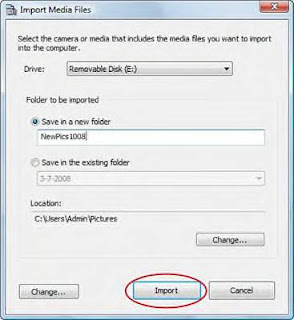
Although most digital cameras come with their own software, Windows Vista has its own built-in wizard for downloading (or importing) images. (If your camera comes with its own downloading software, download your images with that program.) If your camera or card reader is supported within Windows Vista (check the manufacturer’s Web site or the specifications on the side of the box), you can use the Scanner and Camera Wizard to download images:


Enlarge1Connect the cable that came with your camera (or your external card reader) to the corresponding port on your PC.
This port is very likely your PC’s USB port. The Scanner and Camera Wizard screen appears when you plug in the USB cable from your camera.

Enlarge2If you want to assign an optional tag to the images from this camera, click in the Tag These Pictures text box and type the description.
By default, Vista uses the tag you enter to name the images and videos when they’re imported. For example, if you enter the tag Fun Photos, the filenames are Fun Photos 001.jpg, Fun Photos 002.jpg, and so on.

Enlarge3Click Import to begin downloading the images.
After the download is complete, Windows Vista automatically opens the Windows Photo Gallery with the photos you just downloaded in the pane on the right side of the window.

After the images have been transferred, you can unplug your camera’s cable. If you’re done with your images, you can close the Photo Gallery application.

PCs Glossary
application
A kind of software used for productivity or to create things (the software that does the work).
PCs Glossary
cable
A means of accessing the Internet that runs through your cable TV coaxial connection.
PCs Glossary
digital
A means of storing, transmitting, manipulating, or reproducing data, images and sounds by using groups of electronic bits represented by 1 and 0.
PCs Glossary
port
A place on a computer where you can attach a device to send and/or receive information.
PCs Glossary
program
A type of software that may or may not be used for productivity or to produce output, such as a computer game or a video editing program.
PCs Glossary
scanner
A device that attaches to a computer and can create a graphics file of an object you place on the scanner (much like a photocopier, only a scanner produces a file rather than a paper copy).
PCs Glossary
screen
The part of the computer monitor on which information is displayed.
PCs Glossary
software
Instructions that tell the computer hardware what to do or how to act; the brains of the computer.
PCs Glossary
USB
Universal Serial Bus; a computer connection that you can use to attach many different kinds of devices and peripherals to a computer.
PCs Glossary
Vista
The most recent version of the Windows operating system.
PCs Glossary
Windows
The most common operating system on PCs.
Be Sure to Leave Your Comments!

Tuesday, January 27, 2009

Free Domain and Hosting


Today I just found this free host They offer completely ad-free cPanel web hosting. No ads will ever be forced onto our users webpages. There are no catches, no setup fees, no forced advertising, no banners, no popups and no hidden charges. Only totally free hosting service.- 350 MB of Disk Space- 100 GB Bandwidth- Your own domain hosting- cPanel Control panel- Website Builder- Automated Scripts Installer (20 Popular Scripts)- Wordpress 1 click install- Over 500 website templates ready for download- Free POP3 Email Box and Webmail access- FTP and Web based File Manager- PHP, MySQL, Perl, CGI, Ruby.- Zend & Curl Enabled- No Ads at all !- IMMEDIATE Activation!Check it out Here: http://www.000webhost.com/41138.html

I found this Post at Free Domain and Hosting
Be Sure to Leave Your Comments!

Thursday, January 22, 2009

Top 9 Methods to increase your Alexa Ranking

In order to increase your Alexa ranking you must be proactive in your strategies and plan your steps carefully to succeed. With the right Alexa ranking you can demand higher prices from current advertisers and attract new advertisers just the same.If you want to increase your Alexa ranking, there are a few things you can do right now to get there. Remember in order to move up in your Alexa rank, you have to bump someone out. You are competing for someone else's ranking and you better be willing to do what it takes to achieve a higher ranking.
Below is the Top 9 methods to increase your blog Alexa ranking:1. Sign up for an Alexa traffic exchange program such as http://www.upmyrank.com , the large numbers of users can boost your Alexa ranking dramatically.2. Be sure to install the Alexa toolbar for Internet Explorer and Firefox. Additionally be sure to set your website as the default homepage for both browsers. Be sure to use each browser when you are online as each will have a different toolbar id and may be seen as 2 different users.3. Put up the Alexa rank widget on your website. While the exact effects are unknown, it seems to help give the site a slight boost.4. Encourage others to use the Alexa toolbar. This includes friends, fellow webmasters as well as site visitors. Be sure to link to Alexa's full explanation of their toolbar and tracking system so your readers know what installing the toolbar or extension entails. Additionally you may want to ask your close relatives to install the toolbar and set your homepage as their main site.5. Have co-workers or own a company? Get the Alexa toolbar and SS Firefox extension installed on all computers and set your website as the homepage for all browsers. Perhaps it will be useful to note that this may work only when dynamic or different IPs are used.6. Write or host content about Alexa. Webmaster and bloggers love to hear about ways to increase their Alexa rank. They'll link to you and send you targeted traffic (i.e. visitors with the toolbar already installed). This gradually has effects on your Alexa ranking.7. Publicized your URL in webmaster forums. Webmasters usually have the toolbar installed. You'll get webmasters to visit your website and offer useful feedback. It's also a good way to give back to the community if you have useful articles to share with others. Be careful not to spam boards as you could be banned from the forum or worse have your site terminated by your host.8. Write content that is related to webmasters. This can fall in the category of domain and SEO, two fields in which most webmasters will have the Alexa toolbar installed. Promote your content on social networking websites and webmaster forums. Feel free to place the article on your website!9. Create a webmaster tools section on your website. This is a magnet for webmasters who will often revisit your website to gain access to the tools.Note:* Alexa redirects option is no longer supported by Alexa........ by BlogTactic


Be Sure to Leave Your Comments!

Monday, January 19, 2009

Easy to find Good Keywords that you can use

We can always use good keywords and here I found a site that you can download and find alot of good keywords you can use for your webpage so check it out and see what words you can use.
Good Keywords v2 - The original classic software for finding good keywords
Good Keywords is a free Windows software for finding the perfect set of keywords for your web pages. Knowing the right keywords to target is very important because your site should provide what people are searching for.
Good Keywords is completely free. No registration, no payments, no nag screens! It is a small 500Kb download, digitally signed and safe to install. We don't even ask for your email address. Be Sure to

Download Good Keywords
More About Good Keywords Leave Your Comments!

Thursday, December 25, 2008

Fujitsu ST6012 Tablet PC


When I come across a cool new gaget on the web I immediately want to share it with all of you so you can see and know whats new. Enjoy!
You have got to love all these new electric tablets that are coming out these days! One of the latest is the Fujitsu ST6012. I’m sure most of you are familiar with the name of Fujitsu. For those that aren’t, we have reported on this company’s products before, most recently, the Laptop4Life Program.

The Fujitsu ST6012 is a 12-inch tablet PC that comes with some very interesting features including a TFT WXGA display with indoor and outdoor wide views. It is also equipped with an integrated Intel Wi-Fi Link 5300AGN (802.11a/b/g/draft-n) as well as Bluetooth wireless.

Under the hood of the ST6012 is an Intel Core 2 Duo Processor Ultra Low Voltage SU9400 and Intel Centrino 2 with Intel Pro Technology. As for the memory, it has 1GB DDR3 MHz memory, and 80GB S-ATA 150, 5400 rpm hard drive2.

As for the software, it comes with Genuine Windows Vista Business, Bonus Media with Microsoft Office OneNote 20071 and Microsoft Office Ready PC. It also includes a fingerprint sensor, embedded TPM, a Smart Card slot, as well as the Fujitsu Security Application Panel.

If that isn’t enough, the ST6012 comes with an integrated camera and wireless USB. If you are interested in this, (and how could you not be) it will cost about $1,999-2,579. Source: PC Gagets


Be Sure to Leave Your Comments!

Friday, December 19, 2008

Free Images to Bolster your Blog

I came across this article while blog hoppin and I wanted to share it with you all for I know it can be of interest to you all to help improve your blogging.

A few weeks ago, I blogged about a survey from MarketingSherpa that showed that adding certain things to an ad increases user responsiveness. At the time, I was focused on video; specifically how bloggers can use it to better engage their reader and even increase conversions if they happen to be an affiliate blogger. But video wasn’t the only item on MarketingSherpa’s list. In fact, the top item was images.
Images are a great way to give your blog an added professional touch. After all, a picture is worth a thousand words. And the best part is that getting decent picture doesn’t have to cost you anything at all.
Free Photos
A great source of free images for your blog post is Flickr. The site features millions of images, and many of them are free and of a very high quality. The free images are under a creative commons license, meaning that you just have to give credit to the photographer. A great way to do that is to add a caption to the image, and use the image itself to link back to the image’s page on Flickr.
If you’re an affiliate blogger, however, and you want to use a Flickr photo to help increase sales, you should double check the creative common license on it. Some people share content under the condition that it’s not used for commercial purposes. Granted, you could probably get away with using their images anyway, but it would be unfair to the photographer who is being nice enough to share their work with you and the world for free. Just think blogger ethics. Besides, if affiliate blogging is your bread and butter, the affiliate program that you blog for most likely offers affiliate marketing tools that you can use to get the same level of user engagement. These will often include banners and image that are perfect for showcasing the product you’re promoting by blogging about. And even if they don’t, chances are that a quick email to your affliate manager can get you the images you need to better engage your readers.
Written by CT Moore from Share Results Be Sure to Leave Your Comments!

Wednesday, December 10, 2008

New Nokia N97 shares same slide out keyboard


The Nokia N97 doesn't look anything like earlier leaks have suggested and it's easily the most exciting device Nokia has announced this year.The design of the N97 might bring your thoughts to the HTC TyTN II as it shares the same slide out keyboard and tiltable display, but the similarities end there. The fascia doesn't look that different from the iPhone, albeit in white and having three buttons instead of a single one.The specifications are truly awe inspiring, starting off with a 3.5in touch screen with 640x360 (16:9) resolution and haptic feedback, a slide out QWERTY keyboard, a 5Megapixel camera with Carl Zeiss optics and dual LED flash, WiFi, Bluetooth, A-GPS, HSDPA, 32GB of built in flash memory, a microSD card slot, FM-radio, FM-transmitter (for sending music from the phone to a radio tuner) and a 3.5mm headphone jack which doubles up as TV-out socket.The keyboard doesn't look like the best we've seen, but considering that the N97 measures 117.2x55.3x15.9mm (HxWxD) it's not a bad feat incorporating a keyboard, especially when you consider that the iPhone 3G measures 115.5x62.1x12.3mm (HxWxD) which actually makes the N97 narrower, if somewhat taller and thicker. The N97 weighs 150g which is a bit on the heavy side, although the iPhone 3G comes in at 133g, so again, not a huge difference.Nokia claims the battery is good for 1.5 days of music playback. The N97 uses the S60 5th edition OS which is the same as the Nokia 5800, but with some N-series tweaks which adds extra functionality. The N97 also supports various on-screen keyboards and handwriting recognition. It also supports Nokia maps and the new N-Gage platform.
Be Sure to Leave Your Comments!

Wednesday, December 3, 2008

USB-Powered Speaker in cutie sheep design


If you’re into cute and cuddly gadgets, you might want to take a closer look at this new USB-powered speaker. The sheep-shaped accessory connects to portable audio players, laptops and other products using a standard 3.5mm stereo audio plug.


Product Specifications:

Cutie sheep design
Embedded speaker
Powered by USB
Connect it to your PC, notebook PC, iPods or any MP3 / MP4 players with the 3.5 audio jack
Size: 104*104*102mm
Weight: 300g
The USB Sheep Speaker is available in two different colors, white and pink, and the product can be purchased through the gadget4all.com website for $24.


Be Sure to Leave Your Comments!

Friday, November 28, 2008

Temporary Vista Files

Are you one of the many users now using a Windows Vista computer? If you said yes, then answer me this: do you use Internet Explorer 7 as your main Web browser? If so, are you having a little trouble figuring out how to delete all your temporary Internet files? We have preached on this topic before for Windows XP and it's just as important with Vista. (Just in case you're not sure, temporary Internet files are files used by your computer to save certain information about the Web sites you visit. If you delete them on a regular basis, it will drastically improve your computer's overall performance). Alright, with all of that said, let's find out how you can do this with IE 7 in Vista!

There are two different ways you can do this. First, in Internet Explorer, go to Tools, Internet Options and under the Browsing History section, click on Delete. Then beside the Temporary Internet Files option, click the Delete Files button. Click Yes to confirm and the files will then be deleted. The second option is to click on the Start button and type "disk" into the search box below it. In the results, find Disk Cleanup and click on it. Choose the drive you want to clean out and then click OK. Next, checkmark the box next to Temporary Internet Files, click OK and then click on the Delete Files button.

On a side note, another way you can get rid of your temporary Internet files is to use the CCleaner program, but I would recommend using the other methods first. Also, if you would like to view the files you're deleting before you actually go through with it, you can do so by clicking on the View Files option first, before going on to delete them. That way, you can see what you're actually getting rid of and save anything you need to beforehand. Either way, this is something you should do regularly so that your computer will work at its best. Now, go on and give it a try!

Be Sure to Leave Your Comments!

Raise Your Keyboard


Today, I have one question for you: "How do you feel about the height of your keyboard?" Okay, so that may seem like a pretty odd question, but believe me, it's legit for this quick tip! I'm talking about the height of your keyboard as it sits on your desk (or wherever you may keep it).

Some of you may know about this, but the rest of you may not, so I thought this would be a neat little entry for today's newsletter. Go ahead and flip your keyboard over on its back. What do you see? Besides some wording, etc., you should see two clips on either side of the keyboard. If you pull those clips out and then set your keyboard back down, you will notice that it gains a little bit of height. Wow, who knew?!

Those special clips are there to help you get the most comfortable feel for your keyboard. If it's better for your hands to be a little higher as you type, use the clips. If you try it for awhile and decide you don't like it, push the clips back in and your keyboard will then sit flat on your desk once again. It's just an easy way to achieve the best fit for all of your typing needs. Check it out!


Be Sure to Leave Your Comments!

Monday, November 10, 2008

Make money on line with MoreNiche


Make Money Online or Make money at home and anyone of you can do it.. IF you want a FREE website you can get that also at Moreniche..This is a good Blogging tip.
Make Money Online with MoreNiche.com its similar to the google ads you post but this program right out of the gate will earn you $45 dollars for signing up and also pay $20 dollars per person you refer into their program. So, there is a huge incentive to join and invite your friends. The program itself appears to be great. They have tons of products, such as Aloeride, Wasspoker, Proactol, etc. that you can promote and market on your site. Some will pay you up to $300 in commission. It sounds to good to be true? But it is so go and check it out for yourself now and start earning some money today. Click on this Link MORENICHE Be Sure to Leave Your Comments!

Thursday, October 23, 2008

Plan and launch your PPC campaign

Plan and launch your PPC campaign and keep track of its progress
If you want potential customers to form a traffic jam at your Web site, Make Pay Per Click work for you, it just might do the trick.
Discover how to

Use the right keywords to trigger your ads
Figure your breakeven point
Write ads that reach your customers
Calculate return on investment
Use geo targeting
Track your ad results
Be Sure to Leave Your Comments!

Sunday, October 19, 2008

Vista on Screen Keyboard

How many of you remember talking about an on screen keyboard for Windows XP awhile back? Come on, don't be shy, raise those hands! Well, recently, several of you have been asking about that very same thing for Windows Vista. I don't know if a bunch of you just upgraded to Vista or if you just now remembered about the on screen keyboard option, but I can tell you're dying to know more about the Vista version! So, I guess the least I can do is put your inquiring minds at ease. Here we go!

First of all, to get to the on screen keyboard in Vista, go to Start, Control Panel and click on the Ease of Access link. Next, click on the Ease of Access Center link and you will then see all of the accessibility options Vista has to offer, including a Magnifier, On Screen Keyboard, Narrator and High Contrast. For this tip, we're just going to focus on the keyboard, but feel free to browse through those other choices later on! To begin, click on the On Screen Keyboard link and wait for it to pop up. Once it's up on your screen, you can start using it however you wish. You can use it to type an e-mail, to work on a Word document or whatever you may be doing. Just use your mouse to click on the letters and they will show up just like you were using a real keyboard. Awesome!

There are also some additional options you can choose from when using the on screen keyboard in Vista. Under the Keyboard menu, you can choose between an enhanced or standard keyboard (it just changes the way the keyboard looks), a regular or block layout and you can choose how many keys you want your keyboard to have (either 101, 102 or 106). Under the Settings menu, you can opt to have a clicking sound when you're typing, you can decide which typing mode works best for you and you can even change the way the font looks. There's even a Help menu if you need further assistance. The on screen keyboard is just something you can use to give your typing fingers a little rest. I love it and I'm sure you will too. Give it a try on your Vista computer today! Source: Steve at Worldstart.com

Be Sure to Leave Your Comments!

Thursday, October 2, 2008

The How Of Blogging

What about the how? Bloggers invest significant time in creating and updating their blogs, as well as driving traffic and retaining their audiences.

One in four bloggers spends ten hours or more blogging each week. The most influential bloggers are even more prolific. Using Technorati Index data, we analyzed the posting and tagging behaviors of bloggers according to their Technorati Authority. Over half of the Technorati top authority bloggers post five or more times per day, and they are twice as likely to tag their blog posts compared to other bloggers.

From their use of RSS feeds, video, photos, and mobile updates, bloggers are also tremendously sophisticated in leveraging the available tools to make their blogs more robust.

Bloggers employ a variety of technologies to attract visitors. Top audience-building strategies include: listing their blog on Technorati and Google, commenting or linking to other blogs, and tagging blog posts so that they are more easily searchable. All of this hard work has paid off — half of active blogs attract more than 1000 monthly visitors.

BLOGGER PROFILE

Time spent blogging
Bloggers invest a significant amount of time in creating and updating their blogs, as well as other blog-related activities.

Time Spent Blogging Each Week

One in four bloggers spends ten hours or more blogging each week, and about half spend more than five hours weekly on their blog. Only 15% of active bloggers spend less than one hour per week on their blog.

Blogging with help
While the majority of bloggers manage their blogs solo, among professional and corporate bloggers, one in ten pay staff to contribute to their blogs.

Employ any Staff for Blogging

One in five corporate bloggers have paid full-time or part-time staff. Across both professional and corporate blogs, a higher percentage have unpaid help.

Technorati 100, Next 500, and Next 5000 comparisons
We analyzed the Technorati index data to see whether higher-authority bloggers behaved differently from other bloggers.

Posting by Technorati Authority
Group Average Authority Avg Days Posting
(June 2008) Avg Monthly Posts
(June 2008)
Top 100 6,084 23 310
Next 500 1,551 20 125
Next 5000 439 13 25

Blogs with higher authority are typically updated more frequently than blogs with lower authority. The Technorati Top 100 blogs had more than twice as many postings in June 2008 as the next 500, and more than 12 times as many postings as the next 5000.

Posting Frequency

Technorati Top 100 bloggers are twice as likely to post ten or more time daily compared to the next 500, and 14 times as likely than the next 5000. Looking again at Technorati's tracking data shows how often the Top 100 bloggers post each day compared to the next 500 and the next 5000. The Technorati Top 100 are prolific, with 43% posting ten times per day or more often. Only 8% post once a day or less frequently, compared to 13% of the next 500 bloggers, and 22% of the next 5000 bloggers.

Technorati Top 100 bloggers are twice as likely to use tags in their posts
Tagging blog posts is another way of ensuring that people can search for relevant content within a blog.

Percentage of Bloggers who Use Tags

Technorati's tracking data shows that the Technorati Top 100 bloggers use tags much more frequently than the next 500 and the next 5000 bloggers. The Technorati Top 100 bloggers are twice as likely to use tags in their blog posts compared to the average of the 5MM active bloggers tracked in June.

Broad categories are the most popular tags
Technorati index data uncovers the most popular tags during the month of June. “News” was the #1 most-used tag by bloggers, appearing close to 200,000 times over the course of the month.

Most Popular Tags
(June 2008) Times Tag Used
1 News 191,403
2 Music 71,531
3 Video 63,855
4 Internet 56,849
5 Blog 56,733
6 Politics 53,986
7 Life 52,805
8 Business 50,413
9 Videos 40,162
10 Movies 36,205
11 Technology 35,456
12 Family 34,745
13 Travel 33,172
14 Sport 31,646
15 Sports 30,323
16 Entertainment 28,413
17 Software 28,269
18 Diary 28,499
19 Humor 28,230
20 Art 25,852

General categories such as news, music, video, politics, and business tend to be the most popular tags.

Technorati's top bloggers had eight blog posts tagged “News” on average
Technorati's Top 100 bloggers use this tag more than two times as much as the next 500, and 19 times as much as the next 5000.

Average Number of Tags/Blogger by Technorati Authority

Shown here are some of the more popular tags and how many times those tags were used on average by the Top 100, next 500, and next 5000 bloggers. This data reinforces the fact that Top 100 bloggers use all tags more frequently than other bloggers.

Trends can also be tracked by looking at tag growth over time
Andy Murray, the Scottish tennis player who made it to the finals of the U.S. Open, saw his popularity grow once he beat Rafael Nadal on September 7, 2008.

Posts by Day about “Andy Murray”

Posts tagged “Obama” peaked during the Democratic National Convention, reaching their highest point on the day of his acceptance speech and the day following (August 28 and 29, 2008).

Posts by Day about “Obama”

Posts tagged “McCain” spiked on August 29, 2008, the day he chose Sarah Palin to be his Vice Presidential running mate, and then again during the week of the Republican National Convention.

Posts by Day about “McCain”

Sarah Palin had more tagged posts than Obama or McCain after her speech at the Republican National Convention on September 3, 2008, confirming the intense interest about her across the media and the blogosphere.

Posts by Day about “Sarah Palin”

Bloggers are using tools on their blogs
Bloggers are also tremendously sophisticated in leveraging available tools to make their blogs more robust or easily updatable.

Tools Used on Blog

More than eight in ten have a commenting system, archived posts, and have built-in syndication. Others use video and photos on their blog, or update their blog via a mobile device. On average, bloggers use seven of the 13 tools listed.

Among those with widgets, the majority of bloggers use at least four widgets on their site and two-thirds would include a widget with an ad on their blog.

Among those blogs with RSS feeds, three in four support full-content feeds.

How bloggers attract visitors
Bloggers are savvy and resourceful in generating traffic.

How Bloggers Attract Visitors

Top traffic-building strategies include: listing their blogs on Technorati and Google, commenting on or linking to other blogs, participating in a blogroll or blog directory, and tagging blog posts so that they are more easily searchable. Active bloggers have learned a variety of techniques for attracting visitors to their blog, conducting an average of five different activities to attract visitors. 28% do at least seven activities.

Bloggers are also adept at linking to and from other sites — they have a median of 29 links from their blog to other web sites (with a mean of 3400), and a median of 30 links from other web sites to their blog (with a mean of 4800).

To build loyalty with readers, bloggers create events for their readership
In order to retain visitors to their blogs, sophisticated bloggers are creating readership events.

Have you ever worked with your readership to create an event, either online or in person? Type of blogger
Corporate bloggers Professional bloggers Personal bloggers
Yes, in person 10% 8% 6%
Yes, online 13 14 11
Yes, both online and in person 24 17 13
No, I have not created an event with my readership 53 61 70

The majority of these events are in person, with one in five personal bloggers hosting an in-person event and one-third of corporate bloggers hosting an in-person event.

The vast majority of bloggers are tracking their site visitors and monthly pageviews
Only 5% of bloggers did not know how many monthly pageviews their blog received. All this hard work has paid off for active bloggers in terms of site visitors. Half of bloggers attract over 1000 unique visitors per month.

Tool Usage
Google Analytics is the most common tracking tool (used by 2/3 of bloggers)
Sitemeter and Statcounter used by one in five bloggers
42% use more than one service/provider for their analytics
Over 100 different tracking tools used

The majority of bloggers use Google to track blog visitors. However, bloggers do use a range of tools for site analytics, as our survey respondents mentioned more than 100 different tracking tools.

Bloggers are investing money
Select bloggers are investing significant money in their blogs (including hosting, marketing, staff, and paid contributors).

How many dollars have you invested in your blog over the past year? Dollars invested in blog over past year
MEAN US$ invested MEDIAN US$ invested MAXIMUM US$ invested
ALL $1,020 $50 $200,000
U.S. bloggers 635 80 75,000
Europe bloggers 2,140 15 200,000
Asia bloggers 940 30 70,000
Corporate bloggers 3,790 200 200,000
Bloggers with advertising 1,800 100 200,000
Bloggers without advertising 100 0 5,000

Bloggers with advertising invest significantly more money in their blogs than bloggers who do not accept advertising. The mean investment in blogs is $1,000 over the past year. However, the median investment is only $50. European bloggers and corporate bloggers invest more in their blogs on average, as do those bloggers who have advertising support.

Day 4
Blogging For Profit Day 2
The What And Why Of Blogging
Which of the following is a "must have" when signing up for new cell phone service?


Internet access Plenty of minutes
Unlimited texting


Top tags
news
sarah palin
politics
john mccain
barack obama
apple
economy
united states
media
iphone
Blog posts mentioning news per day for the past 30 days.. Source: technorati, State-of-the-Blogosphere

Be Sure to Leave Your Comments!

Sunday, September 28, 2008

Attention: I'm Back- Hurricane hit Houston Hard


Happy to say Im back online after close to three weeks without no lights or water its been hell. The Hurricane hit us here in Houston very hard, trees were down all over the place. On streets on the roofs of houses on the telephone poles and the streets well you could not get through some of them for all the trees on the roads and some of the streets near the freeways looked like lakes thats how bad they were flooded. I had not seen such a Hurricane like this in years and hope never to see one again. I was miserable without any light, all we had were candles or flashlights or lanterns and did I ever miss my computer and t.v. We all had to get water from places that were donating soldiers rations and bottled water and ice and you were lucky if you could get some ice. I used a small ice chest and kept a few sodas and lunch meat in the chest and luckkkkkkky I was able to find some bread before it was all sold out, also got a few bags of dog food.. If you wanted a Hot cup of coffee youd better have a barbeque grill or propane stove or some kind of burner you could use to heat up your water for your coffee. We also had a curfew put into place and youd better not be on the streets after dark or you go to jail this was because we had alot of looting all over the city. But today finally after three weeks its finally over a little while ago we got the lights back on Hellaluia I never realized how much I missed the lights and my computer and the t.v But now Im back and its back to DOGCENTS and you all know after a Hurricane like this bad one their are alot of abandoned dogs suffering who need food and shelter and medicines, I have several dogs of my own and they also are not eating like they used to because I cant afford it right now altho they are not starving. I asked spca and paws for help but they barely have enough food for the dogs they have so many dogs were left there or their owners left town because of the hurricane and their homes were destroyed or damaged and they can no longer afford to take care of their dogs which is real sad but many lost their homes and have no place to keep their dogs. I myself have sustained damages a tree fell through the front room and there is a huge hole in the roof that I hope someone will help me repair. Fema I hope will help me out. BUt it will only help with certain things and I need help in order to buy some food for the dogs and get them in some type of shelters, and get them some medicines they also need, especially one that has a huge knot right next to his pee pee and that is also swolln as big as a large hot dog I mean its so swollen it looks like a large sausage so come on people dont be so cold hearted please I ask you to please give me a helping hand to save these poor helpless dogs who cannot speak for themselves . I give all I can give but I cannot do it alone I need your help and support what else can I say to you all to help us out besides imagine and picture what it looks like after a bad Hurricane all the destruction, all the large old trees knocked down to the earth like if they were toothpicks and picture all these little dogs with dazed cold eyes wandering around scrouncing for scraps of food to eat trembling with cold and shiverimg with fear, lost alone, until I find them and bring as many as I can home and I try to find them a home but like I said I need your help you can make a difference . I need you to open your hearts up and to have compassion . Help me to be able to continue to help them. Thank you and God Bless you all. Lilyruth
Be Sure to Leave Your Comments!

Tuesday, September 9, 2008

Google seeks New Browser, News must Read

Google Inc is challenging Microsoft Corp with its own Web browser that lets users run many applications that once worked only when installed on local PCs, executives said on Tuesday.
Google introduced a public trial version of its new browser software, Chrome, which is designed to handle not just text and graphics, but more complex computer programs.
Chrome, available in 43 languages in 100 countries at www.google.com/chrome, has been designed to download software and Web pages faster than existing browsers. It even allows users to keep working when one of its windows crashes.
This represents Google's long-anticipated head-on attack on Microsoft and its Internet Explorer, which has three-quarters of the Web-browsing market. Google has backed Mozilla Corp's Firefox browser, which holds about 18 percent of the market.
Google engineers and executives call Chrome a "fresh take on the browser," a 15-year-old technology that is supplanting 25-year-old desktop software as the basic way users interact with computers.
"You actually spend more time in your browser than you do in your car," said Brian Rakowski, group product manager for Google's browser project.
Chrome was seen by analysts as partly a defensive move due to Google's fear that the recently upgraded Internet Explorer 8 (IE 8) could be used to lock out Google. Google's core business of Web search and related advertising depends on browsers.
A Microsoft executive said IE 8 gives users control over how and where they navigate, improves their day-to-day browsing experience, and keeps people safe from new security threats. Be Sure to Leave Your Comments! Source: Reuters

Some of the Blogging Tools you will need


RSS Readers and ResourcesFeedBlitz........................................................................................... Feedburner........................................................................................................................................ Feedpass............................................................................................................................................... FeedReader......................................................................................................................................... Google Reader..................................................................................................................................... JetBrains............................................................................................................................ .My AOL........................................................................................................................................................... My Yahoo............................................................................................................................................. NetNewsWire...................................................................................................................................... NewsFire.............................................................................................................................................. News Gator.................................................................................................. NewsGator Outlook Edition.................................................................................... PageFlakes............................................................................................................... RocketInfo............................................................................................................. Rojo...................................................................................................................... RSSOwl.................................................................................................. ............. RSS FeedReader.............................................................................................................. RSSReader................................................................................................................ Sharpreader.......................................................................................................... ShrookYeahReaderToolsGoogle Analytics.................................................................................................................................. Site Meter.................................................................................................................... OneStat................................................................................................................... StatCounter........................................................................................................... GoStats.................................................................................................................. ........................ MindViz Tracker.................................................................................................. ShinyStat................................................................................................................ Web-Stat................................................................................................................ FreeStats.................................................................................................................... W3Counter............................................................................................................. Blogging Platforms............................................................................................... Blogger..................................................................................................................... Drupal........................................................................................................................ EggBlog................................................................................................................... FlatPress......................................................................................................... LifeType.............................................................................................................. LoudBlog............................................................................................................. Movable Type...................................................................................................... Serendipity............................................................................................................ TextPattern........................................................................................................ Typepad............................................................................................................... Xanga........................................................................................................................ Wordpress...............................................................................................................

Wednesday, September 3, 2008

Google Launches Video for Business


Google has launched video for business with its google apps.
1.Share rich video information – Video sharing makes important communications like internal trainings and corporate announcements more personal, engaging and effective.
2.Keep videos secure and private – Employees can securely share videos with select coworkers or everyone at the company without making confidential information public.
3.No large files or complex infrastructure – Google securely hosts and streams your videos, so employees don't need to share videos over email, or burden IT for a video solution.
4.Everyone at your company can contribute – Employees can share videos instantly. Viewing and annotating doesn't require any special software, just a standard browser.


ShareThis...Be Sure to Leave Your Comments!