
This isn't so easy. The challenge for anyone trying to fix Twitter Search is that the service is extremely good at showing you what's happening on Twitter at any moment. If you add a ranking algorithm to Twitter search results, you risk burying that value. On the other hand, without some form of relevancy indicator or ranking, Twitter Search can get so noisy as to be unusable.
Here are three companies that apply some form of ranking to Twitter search results.
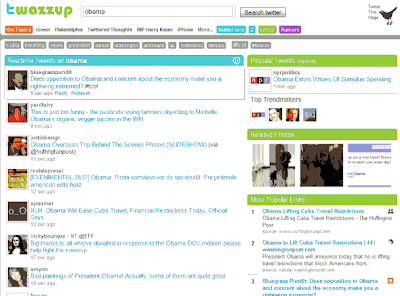
The newest--scheduled to launch at noon on Monday--is Twazzup. It solves the relevancy problem first by not messing with raw time-sorted Twitter search results. Those go to the main column. What shows up around them makes this tool great.
Twazzup doesn't mess with Twitter's time-sorted results. But the related links and lists around the main display add a lot of utility.(Credit: Screenshot by Rafe Needleman/CNET)
First, you get a menu of related words and hashtags at the top of the results page. There's also an expandable "Popular Tweets" sidebar item that has the tweets on your keyword that are the most retweeted or linked to. There's also a list of "Trendmakers," people actively tweeting your keyword. And there are photos and popular links.
My preview of this product showed some performance hiccups, but the concept and presentation are very strong.
Tweefind gives you what looks like a standard Twitter Search (albeit in My Little Pony colors), but it layers a ranking algorithm into the display order.
Currently, it factors the number of followers and the number of retweets on an item in the ranking. Its results are better than the unfiltered Twitter Search, but I have the feeling, when looking at Tweefind results, that I might be missing items I'd like to see. That's the paradox with which all these tools have to deal. More on Mashable:
 Tweefind Applies Google Magic to Twitter Search.
Tweefind ranks results using a Google-like algorithm.(Credit: Screenshot by Rafe Needleman/CNET)
Finally, there's Twitalyzer Search. It shows you raw, time-ordered Twitter results but adds two relevancy numbers to each tweet in the results list: The Influence (I don't understand exactly how this is calculated) and the number of followers the tweet's author has. It helps you find the items from the people to which other Twitter users are paying attention, and since the search order isn't modified, you don't feel like you might be missing other items.
Twitalyzer Search adds Influence and Followers data to standard Twitter Search results.(Credit: Screenshot by Rafe Needleman/CNET)
I like Twazzup the most of these three products, since it presents a lot of useful information while maintaining the value of the raw Twitter search r
 esults. I do worry about the viability of all these experiments.
Twitter Search itself is going to get some sort of ranking technology eventually--possibly from one of these companies, possibly from Google or Microsoft--leaving the others stranded. Until then, try Twazzup. Source: Rafe Needleman - cnet news Be Sure to Leave Your Comments!





 My StumbleUpon Page


![[Valid Atom 1.0]](valid-atom.png "Validate my Atom 1.0 feed")




